
Where can you find your tasks?
You can view tasks via:
-
the asset level (linked to a specific installation)
-
the central task overview (all tasks within your organisation)
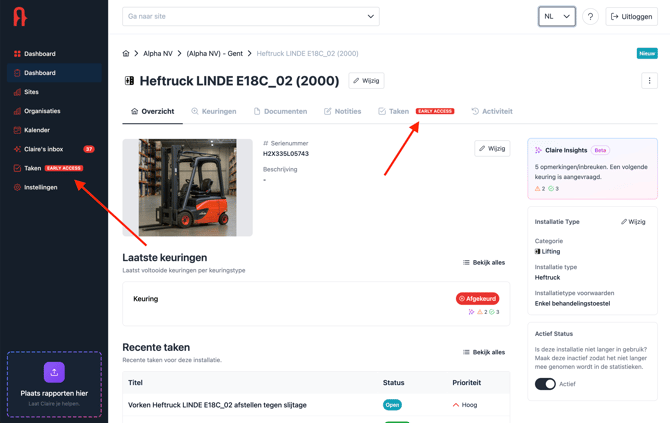
Viewing tasks
Open a task to see all details.
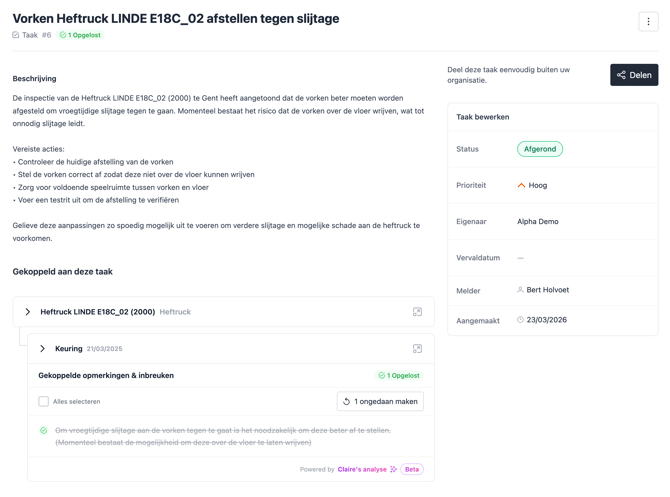
Within a task, you have access to:
-
the title and description
-
the linked violations and remarks
-
information about the asset and location
-
the related inspection
You can also easily navigate to:
-
the asset
-
the site
-
the original report or certificate
Updating the status of a task
You can update the status of a task depending on its progress:
-
Open: the task has been created but not yet started
-
In progress: the task is currently being carried out
-
Completed: the task has been finished
By using statuses correctly, you maintain a clear overview of all pending and completed actions.
Organising tasks
You can manage tasks by:
-
assigning priorities
-
tracking deadlines
-
clearly assigning responsibilities
This ensures a structured follow-up within your organisation.
Result
You stay in control of all actions and always know what still needs to be done and what has already been resolved.