
When should you use this feature?
Use this feature when:
-
the inspection is not carried out through the Artion partner network
-
you have your own contract with an inspection partner
-
the inspection partner is missing from an existing inspection
-
you are adding a new inspection and want to immediately link the correct partner
-
the partner was not automatically recognised based on the uploaded report
Automatically completed inspection partners
For many existing inspections, Artion has automatically completed the inspection partner based on the information found in uploaded reports.
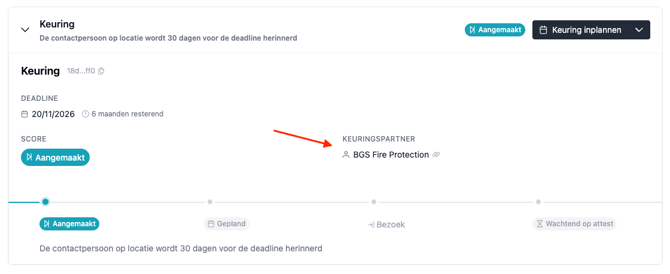
👉 Always verify that the correct partner is linked.
Is the partner missing or is the information incorrect? You can easily adjust this yourself.
Selecting an inspection partner for an existing inspection
Follow these steps to add or change an inspection partner:
-
Go to the relevant inspection.
-
Open the menu and choose “Change partner”.
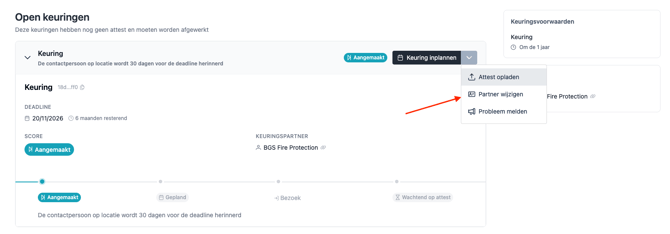
-
Select a partner from the list (showing all partners within your organisation).
-
Click Save.
Adding a new inspection partner
Is the correct partner not yet listed? You can easily add a new inspection partner yourself.
Follow the same steps as when assigning an existing partner. In the dialogue, choose “Add new partner”.
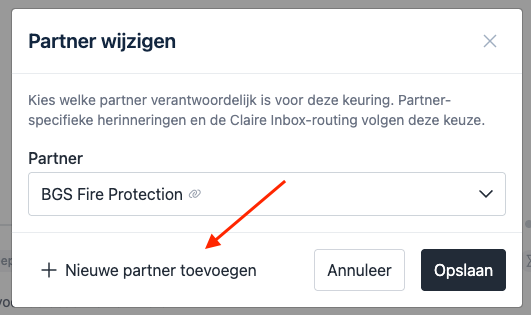
Add the name and save.
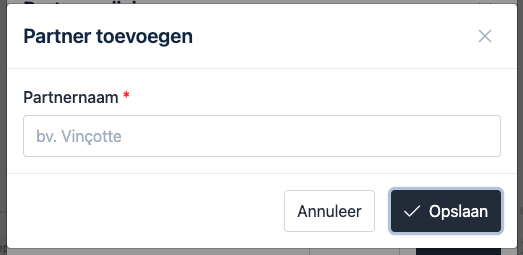
Summary
With inspection partners, you can easily manage which partner is responsible for an inspection.
-
Select existing partners
-
Add new partners
-
Correct automatically completed partners if needed
This keeps your inspection follow-up accurate and transparent within Artion.