
From findings to action
Artion automatically extracts violations and remarks from certificates and reports.
With Task Management, you can now convert these directly into tasks.
You can:
-
create tasks from one or multiple findings
-
assign responsibilities
-
set deadlines and priorities
-
and track everything centrally
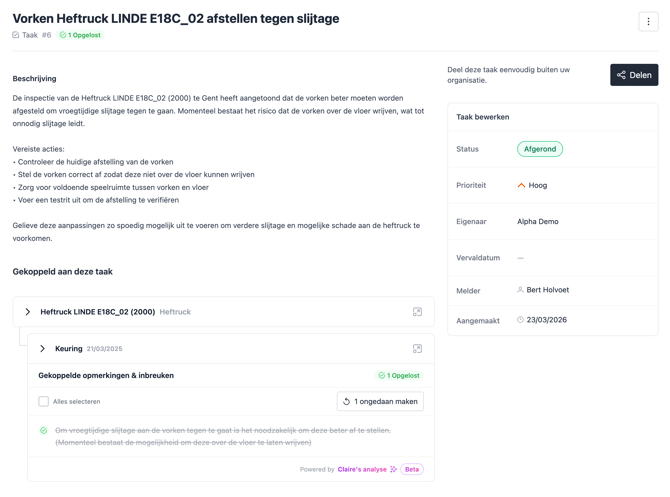
All context automatically available
Each task automatically includes all relevant information:
-
details of the violations and remarks
-
information about the asset and location
-
inspection data
-
and the original certificate or report
This means you no longer need to manually gather information.
Easily share with others
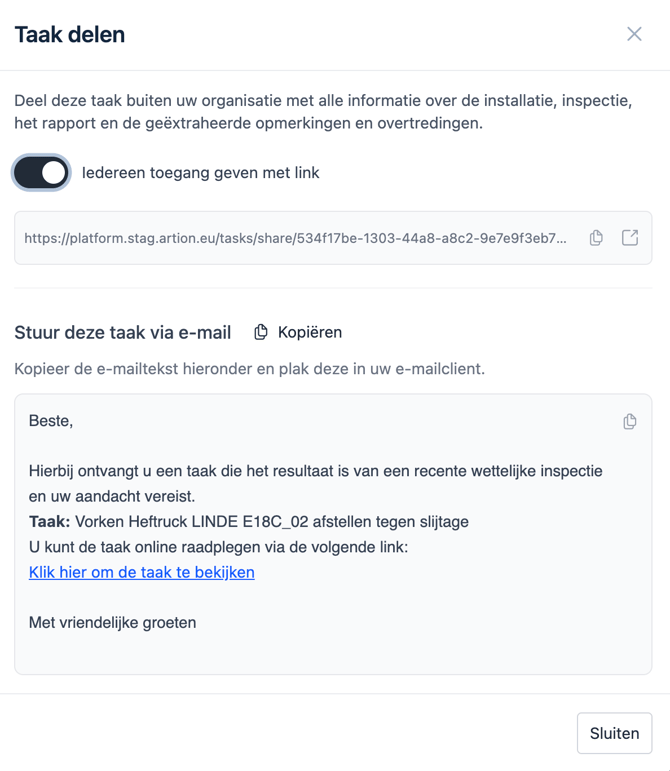
Tasks can easily be shared with internal teams or external partners.
You can:
-
copy an email text
-
or generate a link to a page with all the necessary information
This way, everyone can get started immediately.
Available via early access
Task Management is currently available via early access.
On 24 April, we will officially introduce this feature during our event Connection.
From then on, Task Management will be available as a paid add-on.
Get started
Do you want to start with Task Management right away?
👉 Read here how to get started.
Questions?
Do you have any questions or would you like to discuss how to use Task Management optimally?
Contact your Customer Success Manager or email support@artion.eu.